Front End Performance Techniques
A good website is not only just about aesthetic user interface, optimizing its front end performance is equally important, and in certain domains like e-commerce, checkout conversion performance is highly dependent on website performance.
This article presents a collection of underutilized yet effective strategies that you can use to improve your website's speed and user experience. These are useful concepts to know for front end system interviews as well as for your day-to-day work!
List virtualization
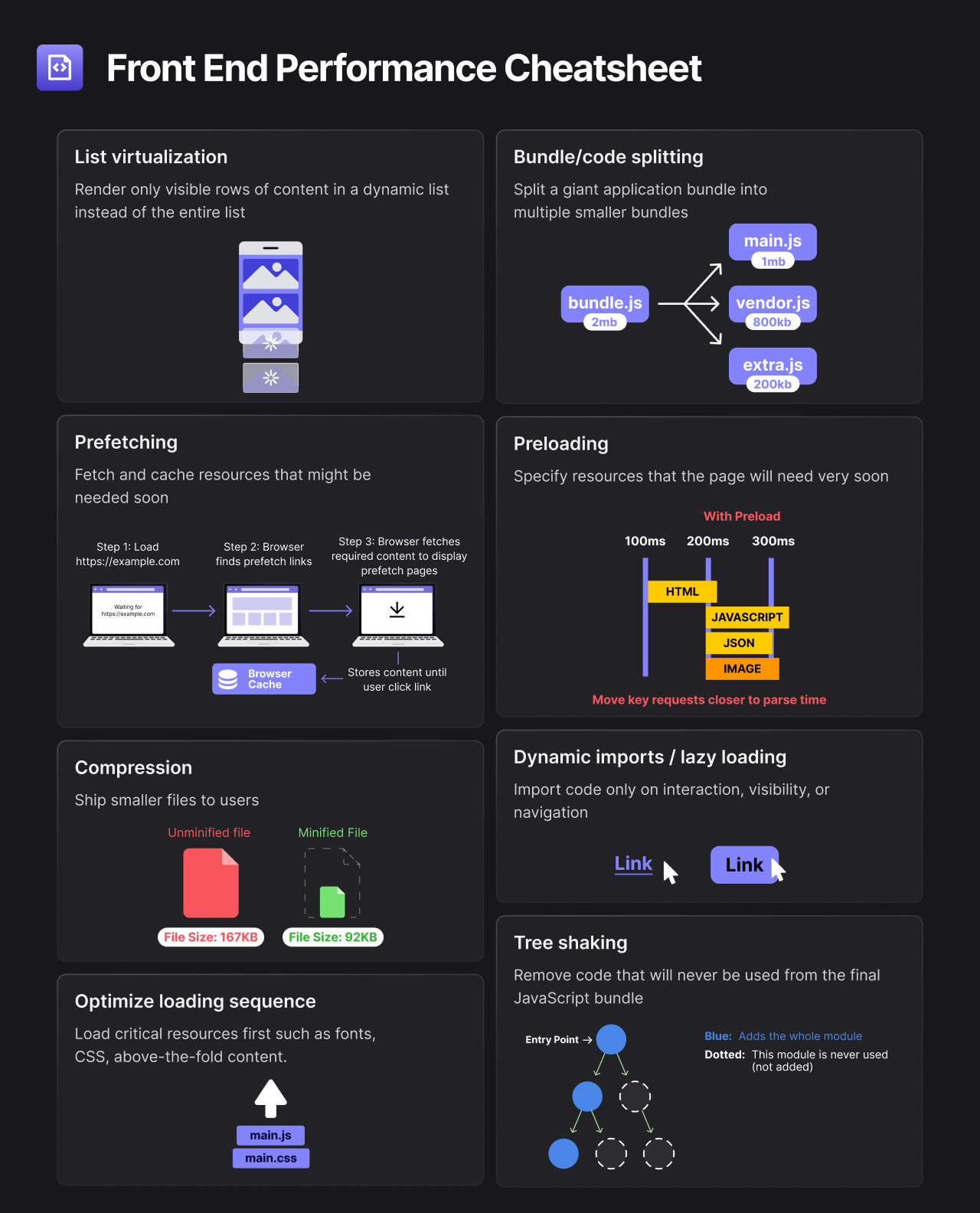
List virtualization is an optimization technique where only the currently visible items in a long list or large dataset are rendered. This method dynamically loads and unloads elements based on the scroll position.
Benefits
- Reduce memory usage
- Reduce initial load time and later
- Smoother scrolling and interaction, as the browser is not overloaded
Implementation
- Install a virtualization library like react-virtualized.
- Wrap list in the virtualization component.
- Set the item count and provide a function to render each visible item based on the scroll position.
Resources
Bundle/code splitting
Both bundle and code splitting are optimization techniques in web development that involve dividing a large codebase into smaller chunks, loading only the necessary chunks at any point of time. This can significantly enhance the performance and efficiency of applications, especially those with extensive codebases or complex dependencies.
Benefits
- Allow browsers to cache parts of the application independently, reducing the need to re-fetch unchanged code
- Faster load times and a smoother and more responsive application
Implementation
- Use a bundler like Webpack or Vite.
- Identify split points (e.g., routes or features).
- Use import() for dynamic imports at these points.
Resources
Dynamic imports / lazy loading
By implementing dynamic imports, we import code only on interaction, visibility, or navigation. Similar to that, lazy loading is also a popular design pattern that delays the initialization of an object until when it is actually necessary for users. These can help to improve efficiency, especially at times when costly resources are not always used.
Benefits
- Reduce initial load time
- Save bandwidth as unnecessary code or resources are not loaded upfront
- More responsive applications as the browser's workload is much less
Implementation
- Identify components for lazy loading.
- Replace their imports with dynamic
import()calls. - Use placeholders while components load.
Resources
Optimize loading sequence
Optimal loading sequence prioritizes the loading of essential resources, like CSS, fonts, and above-the-fold content. This method carefully orders the loading process, so critical elements are rendered first, enhancing perceived performance. By doing this, non-essential items are deferred, largely boosting efficiency and user satisfaction, especially during page initialization.
Benefits
- Faster perceived load time
- Efficient use of network and browser resources by loading only what's essentially upfront, leading to streamlined resource utilization
Implementation
- Identify critical resources for the initial view.
- Use
<link rel="preload">for these resources in the HTML head. - Lazy load non-critical resources.
Resources
Prefetching
Through the prefetching technique, resources are loaded in the background before they are requested by users. This strategy aims to reduce perceived latency and improve responsiveness by fetching resources ahead of time, based on user behavior patterns or predictive algorithms.
Benefits
- Reduce latency
- Smoother transition between pages or actions
- Ensure resources are ready before they are needed
Implementation
- Identify resources for future use.
- Use
<link rel="prefetch">to instruct the browser to load these in idle time. - Monitor and adjust based on user behavior.
Resources
Preloading
Preloading is where specific resources are identified and loaded early in the page's life cycle, even before the browser requires them. This ensures that critical assets such as scripts, stylesheets, and images are readily available by the time they're needed.
Unlike prefetching, which depends on future navigation, preloading focuses on the current page, strategically speeding up the availability of high-priority resources that are crucial for the immediate next steps. This is particularly useful for resources that are essential for the initial view or interactive features of a page, ensuring a smoother and faster user experience.
Benefits
- Immediate availability of critical resources
- Enhance performance and improve reliability of a critical resources loading process
Implementation
- Determine essential resources for the next steps.
- Use
<link rel="preload">for these resources, specifying the type withas.
Resources
Compression
Compression is a method that reduces file sizes for faster user delivery by eliminating redundant data. This not only quickens load times for web pages and apps but also cuts down on bandwidth and associated costs, similar to how tree shaking, which will be explained below, removes unused code to streamline bundles.
Benefits
- Faster data transfer
- Reduce bandwidth consumption
- Lower costs
Implementation
- Enable compression on the web server (e.g., Gzip, Brotli).
- Compress static assets during the build process.
- Ensure compressed files are served with correct headers.
Resources
Tree shaking
Tree shaking is an optimization technique used to eliminate unused code from the final bundle before deployment. By analyzing the import and export statements in a module structure, static analysis tools can determine which modules and lines of code are not being utilized and remove them.
Benefits
- Smaller bundles enhance load times and performance, using fewer resources overall
- Better maintainability with a cleaner codebase
Implementation
- Use a bundler that supports tree shaking (e.g., Webpack).
- Write code in ES6 modules.
- Enable production mode in the bundler to remove unused code.
Resources
Optimizing front end performance is important in providing a fast, efficient, and enjoyable user experience. Techniques mentioned above are often powerful yet often underutilized. By carefully implementing these strategies, we can ensure that our applications perform optimally, keeping users engaged and satisfied.